• Skip to secondary menu
  • Skip to main content
  • Skip to primary sidebar
  • Skip to footer
  • About My Blogging World
  • My Dogs
    • Finally Found an Indestructible Squeaky Dog Toy!
  • Favorite Recipes
    • My Famous Sweet Pickled Jalapeno Recipe
  • Military Pride
  • Photography
    • Project 365
  • Joy of Advent
  • Affiliate Disclosure

3 Quarters Today

My Life, my photography, my passions

  • Graphic Design
  • Military Gift Store
    • Military Gift Ideas
    • Marine Corps Gifts
      • Marine Mom Gifts
      • USMC Veterans
      • USMC Ornaments
      • Boot Camp Books
      • Custom Designed USMC Gifts
    • Army Gifts
      • Custom Army Gifts
  • Shopping at 3 Quarters
    • Unique Photography Gifts
    • Unique Dog Gifts
    • 3 Quarters Photography Shop

Photography

#16/52: My Favorite Country Barn, Edited with Lightroom

April 30, 2012 by info@3QuartersToday.com

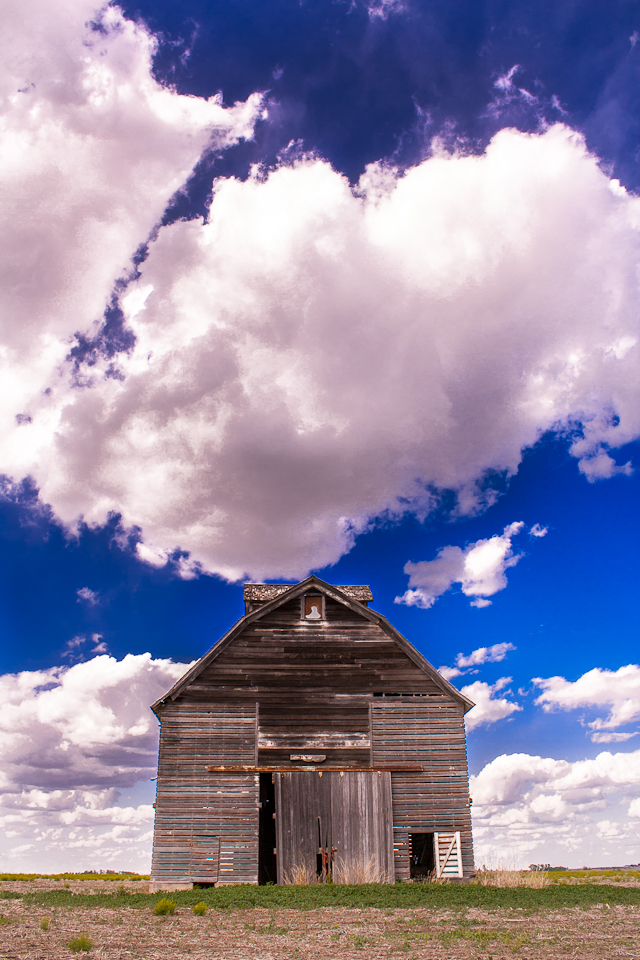
I love country barns  (okay, it’s really a corn crib) in Nebraska is one of my favorite photography subjects, yet this shot is my favorite. I pass it at least twice a day and it sits in the middle of a field with nothing around it, solitary, no trees, just in the middle of a field with either corn or soybeans growing on all sides. It has different moods depending on the light and looks different in the early morning and at night with the sun setting behind the western sky.

My favorite barn gets my attention every time I drive past and have often taken photographs to capture the mode. They never come out exactly how it looks in real life though. But with the help of Adobe Lightroom this has changed, I can actually say that this is truly what the barn looked like that day.
Photographing Country barns
Barn against a Cloudy Sky

From what I understand in reading various photography blogs and sites a camera has difficulty collecting all the dynamic ranges of lights and darks. In simple terms you expose for the sky or your subject. That leaves the other parts of you picture over or under exposed.

The newest version of Lightroom 4 has an amazing capability of pulling out shadows, highlights, whites and blacks without leaving artifacts in the image. This was shot in RAW and I’m very impressed, puts my Photoshop CS2 to shame. The later versions of Photoshop do have more advanced algorithms that achieve the same thing, but I can only compare the programs I use.

I will still keep using Photoshop, Lightroom is only another tool to use and does not have text or graphic design capability. I still love adding drop shadows, borders and creating custom layouts.

Stay tuned for more Lightroom 4 examples, and possibly redo’s of previous photos as a comparison.

More Historic Country Barns

Barns of New York: Rural Architecture of the Empire StateBarn Quilts and the American Quilt Trail MovementBarn Find Road Trip: 3 Guys, 14 Days and 1000 Lost Collector Cars DiscoveredThe Barn: Memoir of a Family during the Nazi Occupation of Holland in 1940-1945

Country Roads and Friday Finds – Keeping With The Times

A Drive in the Country, barns, country, country living, keeping with the. Later in the day I visited Star Lake and ran into this fellow who was pretty much minding his own (business) … A Drive in the Country, barns, country, …

Barns along Polling Station Road | Hoof Beats and Foot Prints

Drive along with me on a windy country road. Polling Station Road in Harwood, Maryland offers views of a variety of country barns. Most of them from a past era of tobacco farming in southern Maryland and stand in the …

D.L. Marriott » Blog Archive » Living in a Fairy Tale

It draws up images of pumpkins and scare crows, hay bales and country barns framed in russet leaves. I grew up in the city, and although my husband and I have spent all our child raising years in the suburbs, pretty far out in …

Filed Under: Project 365 Tagged With: Adobe Photoshop, Adobe Photoshop Lightroom, Adobe Systems, barn, clouds, country, country barns, Elmwood-Murdock, Lightroom, midwest, Photography, Photoshop, rural, sky

Correcting Exposure Using the Histogram: Rowboat

April 20, 2012 by info@3QuartersToday.com

Using the Histogram on your Camera to get Better Photos

Now that I’ve improved my photography and editing skills I’m going through photographs from past years vacation and reworking them in Photoshop. This time I’m using the  histogram to set optimum exposure and getting much better prints. So here is a good example of editing a photo in Photoshop using the histogram, if you remember I took a trip to Block Island, Rhode Island and have hundreds of photos I absolutely love. Too bad I wasn’t shooting RAW then.

Using the histogram in Photoshop
Rowboat on Block Island, RI edited in Photoshop

First I straightened the image about 2 degrees clockwise. I was a little off kilter taking the picture.  The swimmers in the water were bothering me, so I cloned them out.

I’ve learned I cannot rely on my computer screen when it comes to the light balance in a photo. My computer screen is pretty bright and as a result I always misjudge the exposure in my edited photos. The best best is to use the histogram. The same is true when you take photos on your digital camera. Don’t rely on your camera LCD screen, especially during the summer. Use your histogram tool.

As you can see in the initial histogram below, the histogram is pushed to the darkside (left). In the levels adjustment tool I used the far right prompt and brought it to the edge of the curve to brighten up the whole photo. Much better.

Using the histogram in Photoshop
Example of initial histogram in the Photoshop Histogram

Even with my Canon Rebel camera and exposing to the right, I still throw my exposure off, but I am getting better. Although I try not to chimp (constantly look at the camera screen after each shot) I will occasionally check the histogram in camera to make sure I’m not clipping my blacks or whites. As you can see int he photo above the left side of the graph is barely touching, so I didn’t lose very much information in the dark regions.

Canon DSLR Photography Quick Reference Tip Cards & Cheat Sheets for Canon Rebel T5i T4i T3i T3 T2i T1i XSi XS XTi XT 60D 7D 6D 5D Mark III IIBuW OMES L-3 Photography Exposure Meter / Continuous Light Meter with LED Display

If you shoot in RAW then you can recover a lot of digital information in the lights and darks. But I prefer to get a photo properly exposed in the camera as best that I can to eliminate major digital darkroom edits.

Any of the below programs have a histogram function in the editing mode. If you are a beginner then Photoshop Elements is where I would start. That will give you the biggest flexibility as far as text, layers, cloning and photo manipulation. If you just want to edit your photos and not get really creative with layers then Lightroom is the way to go, I LOVE Lightroom. Many people choose to subscribe to the Adobe Cloud for the $10/month you have full usage of both Photoshop and Lightroom and never have to worry about outdated software.

Adobe Creative Cloud Photography plan (Photoshop CC +Editors Keys Dedicated Keyboard for Photoshop | PCAdobe Photoshop Lightroom 6 | PC DownloadNEW ADOBE PHOTOSHOP KEYBOARD STICKERS FOR DESKTOP, LAPTOP AND NOTEBOOK

 How to Use the Histogram to Get Better Photographs

Using the Histogram to Get Better Photos – Pentax Forums

Have you ever wondered what that graph-looking thing on your camera display or in Lightroom was? Or what you are supposed to do with it? If so, then read on to find out more about the mysterious histogram and what it can …

News Shooter | Blackmagic Design add histogram and …

Using the histogram scope, customers can now easily and rapidly set exposure in a shot as the histogram shows the the distribution of luminance in their images and if highlights or shadows are being clipped. Images with …

Histograms Explained: How a Simple Tool Can Help You …

There are a few drawbacks to using the histogram to judge exposure, however. Since it only gives you an overview of exposure by showing you the density of pixels, it can’t give you any specific information about which parts …

Lightroom Histogram Cheat sheet | Photographer Abroad

The contrast of the image can also be determined using the histogram. The more spread out the values are in the graph the more contrast is in the image. Conversely, an image with all the values concentrated in one zone is …

Blackmagic Camera 1.9

Using the histogram scope, customers can now easily and rapidly set exposure in a shot as the histogram shows the the distribution of luminance in their images and if highlights or shadows are being clipped. Images with clipped highlights or shadows …


Filed Under: Photoshop Friday Tagged With: Adobe Photoshop, Block Island, boats, photo editing, Photography, Photoshop, photoshop friday, Rhode island, Travel and Tourism, using the histogram, Vacation, water

#12/52: Flower Porn and More

April 2, 2012 by info@3QuartersToday.com

Oops, did I really say that? Flower porn? Oh, I said it again. I’m really into Flower porn (not human kind so stop there if you are and just leave), which is very close up shots of naked reproductive parts of flowers, the stamen and pistils or macro photography. I just can’t help it, I have to not only look but point my camera at those intimate detailed parts.

Tulip flower porn
Week 12: Tulip flower porn

Some of my favorite flowers to expose are Irises, check out my shots from last year.

Summer Day Lily

The secret to good macro photography is plenty of light and a fast shutter speed. With flower photography wind is your enemy and some days you may just need to bring the blooms inside. Expose for the petals to get the texture and details. Try different angles, different lighting, back-lit sun streaming through the petals. Get on the ground and shoot up against the sky. Break out of the boring and stereotypical flower photos.

Iris Garden in Nebraska
Iris’s Galore

Use an open aperture under 5.0 and focus on the itty bitty flower sexual parts, you know the ones, deep inside the flower that few people look dare peek when no one is looking.

Macro Peony
Macro Peony

Macro Photography Tools

Macro Extension Tube Ring for Canon EOS DSLR / SLR4-In-1 Lens Attachment – For iPhone 6, Telephoto/Macro/Fish Eye +CowboyStudio One Way Macro Focusing Rail Slider Macro Bellows forNeewer FC100 32 Super Bright LED Macro Ring Flash For77mm Macro Reverse Ring Adapter for Nikon AI MountUnderstanding Close-Up Photography: Creative Close Encounters with Or Without aClose-Up and Macro Photography: Art and TechniquesCloseup Shooting: A Guide to Closeup, Tabletop and Macro Photography

Flower Photography Tips

How to master the art of flower photography

Spring has finally arrived, and with it some of nature’s most stunning artistry: flowers. A favorite of nature photographers around the world, flowers can be a surprisingly finicky photo subject. Simply snapping a photo in passing doesn’t quite do the …

How does your garden grow? – OCL series offers something for all garderners

“The basics of flower photography will teach how simple changes can make a big difference in personal photographs. Equipment needs from the very basic to more sophisticated camera equipment, including lenses, props, etc., will be covered.” Participants …

Put a spin on flower photography

Spring is only a couple weeks away and that means flowers will be springing up all over the place. For the camera buff the splashes of colors break the monotony of gray days and generates an eagerness to venture out and capture their long-awaited blooms.

25 flower photography tips for beginners | Digital Camera …

Improve your spring photography with these 25 flower photography tips that show you everything from how to compose to how to set your camera.

Spring is Here: Beautiful Flower Photography – PictureCorrect

Just step out of your door and turn around. Someone has planted flowers in front of the building? That could be the perfect place to trigger a few photos! For some unusual and interesting flower photography, take a trip to nature, maybe to park …

31 Incredibly Captivating Flower Photos by Wei-San Ooi

Here are 31 of my absolute favorites from her expansive collection — photographs of flowers that somehow kick the crap out of (a scientific term) 90% of the flower photography we’ve seen — broken down by type of flower for …


Filed Under: Project 52 Tagged With: Botany, flower, flower photography, Gardening, Gardens, iris, macro photography, peony, Photography, Plant, Plant sexuality, Project 52, Stamen, tulips

Still Evaluating Shooting RAW Photography vs. JPG?

March 30, 2012 by info@3QuartersToday.com

My journey of taking all my photographs in JPG format is over. After experimenting with photo editing between the two formats I will always shoot my RAW photography format  (RAW +jpeg setting) photos. I have much more creativity range once I get to the editing or photo processing phase.

One thing I love about Spring in Nebraska is the blooming of spring flowers. I sometimes get so excited about the sun and colors I forget to meter my camera to the new lighting caused by the bright sun. I’m either over exposing or under exposing.

So  how do we fix what could be a wonderful picture.  If you have a RAW option in your camera you can easily adjust the exposure without causing image degradation or artifacts. If not using Photoshop and adjusting the levels might be your only option. But be warned it doesn’t work on all photos as you can see below.

Did you know that every time you open a jpg file you lose a little bit of digital information in the image? After a few times you don’t notice a difference, but work and rework that file and pixel by pixel it loses detail. (I’m learning just a little bit more and more)

Think of a RAW file as an undeveloped photo, much like film. In a RAW photo editing program you can adjust the exposure, without destroying pixels or the detail.

How to Fix an Underexposed Photo in RAW photography
I know, it’s not sharp either, darned Nebraska wind.

Below is an example of how messy adjusting jpg files can become. In most pictures there is enough texture to “hide” the destruction, but in this night sky the gradient colors quickly become degraded. “Banding” occurs in the color gradients detracting from the night image. With RAW photography files the gradients are smooth.

Over processing destroys jpg images, shoot in RAW when you can

Ideally I would get the right exposure the first time and not have to adjust, but I’m not quite there yet. Many will argue that every digital image needs some post production to perfect it. What do you think? Do you shoot RAW?

Since I took this shot I have started using Adobe Lightroom to process my RAW images. The program is extremely powerful, yet economical in cost and user friendly.

If you want to learn more about why people take pictures in RAW this photography forum thread is worth reading  http://photography-on-the.net/forum/showthread.php?t=684360

Learn About RAW Photography

Black and White Digital Photography Photo WorkshopUnderstanding RAW Photography (Expanded Guides – Techniques)Camera Raw with Photoshop For DummiesCamera RAW 101: Better Photos with Photoshop, Elements,The Digital Negative: Raw Image Processing in Lightroom,Lexar Professional 1100x 64GB XQD Card (LXQD64GCTBNA1100) Size:

More Photography Articles

  • Improve Your Photography in 30 Days
  • Photographing Concerts
  • Why I Shoot in the RAW

Filed Under: Photography, Project 365 Tagged With: Adobe Photoshop Lightroom, Canon EOS, Digital, flowers, Graphics, JPEG, Nebraska, photo editing, Photography, Raw image format, raw photography

Seaport Fence

March 16, 2012 by info@3QuartersToday.com

Seaport Fence with Buoys

One of the benefits of not doing a 365 Project this year is the flexibility to use one of the thousands (yes, thousands) of pictures that didn’t make last years cut. Or, I can pull up an image from years ago, a forgotten neglected image from years gone by.

This fence on Block Island just called me over with the buoys hanging all in a row above the sunflowers. It is so New England and the overcast weather is probably comparably to what it is now, minus the sunflowers.

Photoshop processing: Levels, shadows and highlights, an artist plastic wrap effect at a low opacity and then a final sharpen unmask.

Related articles
  • The NEW AND IMPROVED South Street Seaport Museum (mrdsneighborhood.com)
  • And the winners are! (passingbeforemyeyes.wordpress.com)

Filed Under: Photography Tagged With: Block Island, boats, new england, ocean, Photography, Photoshop, post production, Rhode island, sea, seashore

  • « Go to Previous Page
  • Page 1
  • Interim pages omitted …
  • Page 9
  • Page 10
  • Page 11
  • Page 12
  • Page 13
  • Interim pages omitted …
  • Page 38
  • Go to Next Page »

Primary Sidebar

What I Write About

Check out my tea business

Support my small tea business and find what high quality tea is all about.
Support my small tea business
Christmas lattes for holiday parties and gatherings.
Military Gifts ideas for Marines, soldiers and anyone in the Armed Forces

Categories

Pages

  • About My Blogging World
  • Affiliate Disclosure
  • Army Gifts
    • Custom Army Gifts
  • Best Place to Print Political Yard Signs
  • Cool Gifts for Photographers and Camera Lovers
  • Food & Recipes
  • Google Search Results
  • Marine Boot Camp Resources for Parents
  • Marine Corps Gifts for Any Occasion
    • Best Gifts for Marine Corps Veterans
    • Marine Mom Gifts
    • Marine Mom Shirts & Gifts
    • USMC Ornaments
  • Military Gifts for Birthdays and Christmas
  • Personalized Custom Graphic Design Services
  • Unique Dog Gifts for Pet Owners

Tags

365project Advent animals Block Island christmas Connecticut cooking country dogs Elmwood-Murdock Faith family flowers Food God Holiday Holidays Lutheran Church–Missouri Synod marine Marine Corps memories midwest military music Nebraska Omaha pets Photography Photoshop postaday Product Review project365 recipe rural Silent Sunday small town snacks snow Spring summer tradition travel USMC video winter

Footer

Copyright © 2026 · Lifestyle Pro on Genesis Framework · WordPress