I love country barns (okay, it’s really a corn crib) in Nebraska is one of my favorite photography subjects, yet this shot is my favorite. I pass it at least twice a day and it sits in the middle of a field with nothing around it, solitary, no trees, just in the middle of a field with either corn or soybeans growing on all sides. It has different moods depending on the light and looks different in the early morning and at night with the sun setting behind the western sky.
My favorite barn gets my attention every time I drive past and have often taken photographs to capture the mode. They never come out exactly how it looks in real life though. But with the help of Adobe Lightroom this has changed, I can actually say that this is truly what the barn looked like that day.
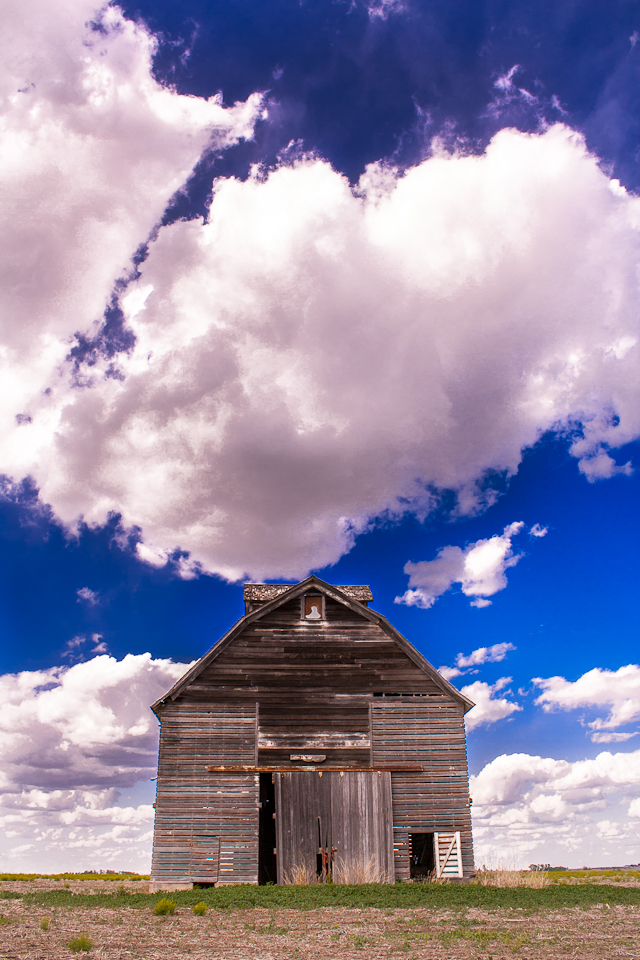
From what I understand in reading various photography blogs and sites a camera has difficulty collecting all the dynamic ranges of lights and darks. In simple terms you expose for the sky or your subject. That leaves the other parts of you picture over or under exposed.
The newest version of Lightroom 4 has an amazing capability of pulling out shadows, highlights, whites and blacks without leaving artifacts in the image. This was shot in RAW and I’m very impressed, puts my Photoshop CS2 to shame. The later versions of Photoshop do have more advanced algorithms that achieve the same thing, but I can only compare the programs I use.
I will still keep using Photoshop, Lightroom is only another tool to use and does not have text or graphic design capability. I still love adding drop shadows, borders and creating custom layouts.
Stay tuned for more Lightroom 4 examples, and possibly redo’s of previous photos as a comparison.
More Historic Country Barns
Barns of New York: Rural Architecture of the Empire State Barn Quilts and the American Quilt Trail MovementBarn Find Road Trip: 3 Guys, 14 Days and 1000 Lost Collector Cars DiscoveredThe Barn: Memoir of a Family during the Nazi Occupation of Holland in 1940-1945


Country Roads and Friday Finds – Keeping With The Times
Barns along Polling Station Road | Hoof Beats and Foot Prints
D.L. Marriott » Blog Archive » Living in a Fairy Tale

Love the colors and contrast. Great edits.
Thanks, I can’t wait to try out Lightroom on more of my photos, but the sky really helped this shot. Clouds were amazing that day!
Nice photo and editing. I LOVE Lightroom (I’m still on version 2) and am obsessed with making my own presets! It’s such a great programme!
I haven’t figured out how to do presets yet in Lightroom, (need to learn) but I love creating actions in Photoshop. Save so much time when I’m doing routine tasks like resizing and adding adjustment layers or frames.
LOVE this Dawn! Awesome!
Thanks! I’m in love with it too…
Love the cotton candy clouds 🙂
Been happily using lightroom 4 for all my editing needs (pure adjustment of photos). It rocks! Nice barn too…I am jealous, would love to have it as a photo subject;-)
I take it you had Lightroom 3 before. This barn is one of my favorite photography subjects. Nebraska can have such a dramatic sky, a simple bare barn is all it needs.
I think I have stopped to shoot this very barn–or one very much like it. Where is it? Nice job bringing it to life.
In Nebraska between Elmwood and Murdock, I love the barn, I need to do just a calendar on that barn.
Amen. I will have to locate the image I am thinking of–it isn’t the same place, but is very similar. Your rendition is so much better with the help of some great technology and the know-how to use it. We are a long way from Kodachrome 64!
What was great about the shot is it’s not too far off from the SOOC. I exposed for the amazing sky and just opened up shadows in LR. I look at that barn every day and haven’t seen it as dramatic as that day though. Amazing sunsets behind it though during the right season, but not any clouds. I love clouds.
I use Lightroom 4 the most, followed by PaintShop Pro X4, Photoshop CS6, Photo-Paint X5, CorelDraw X5, and even Word 2010. It just depends on what I want to do. For quick and easy, it’s Lightroom 4.